Trakkar, time tracking and attendance software for Indian service businesses.
The right attendance software depends on what else it has to do. If your team bills clients for its time, pick one that keeps attendance, leave, project hours and GST invoices in one record, like Trakkar. If attendance mainly feeds HR and payroll, an HR suite such as Zoho People, greytHR or Keka fits better.
The best attendance software in India, at a glance
- Trakkar: attendance, leave, project time tracking, a client portal and GST invoicing in one plan, at ₹120/user/month + GST. Clock in on the web, Android or iPhone. Good fit for agencies, IT services firms and other teams that bill for their time.
- Zoho People: an HR suite. Attendance starts on the Professional plan (₹96/user/month billed annually), with attendance from web, mobile and facial recognition. Good fit for teams already using other Zoho apps.
- greytHR: payroll and HR software. The Growth plan adds attendance and shift management, overtime and geo-fencing to payroll and leave. Good fit for HR teams that run payroll and attendance in one tool.
- Keka: an HR and payroll platform. It lists selfie clock-in, geo-fencing, shift management and a mobile app, plus PF, ESI and TDS reports. Good fit for HR teams that want payroll and attendance together.
- Jibble: a time and attendance app with a free plan for unlimited users. It lists GPS, geofences and face recognition for clock-ins. Good fit for teams that want a free starting point.
- DeskTime: automatic desktop time tracking with published INR prices. Shift scheduling and the absence calendar are on Premium. Good fit for teams that mainly want automatic desktop tracking.
- Hubstaff: time tracking with attendance and time off, priced in USD per seat. Good fit for remote teams that are fine paying in USD.
Comparison table
| Tool | Price (as published) | Attendance method | GST invoicing | India focus | Mobile apps |
|---|---|---|---|---|---|
| Trakkar | ₹120/user/month + GST list price, paid upfront for 6 months (5% off, ₹114) or 12 months (10% off, ₹108); no setup fee | Clock in/out on web, Android and iPhone; grace periods per shift | Yes: GST invoices with your client's GSTIN, one tax rate per invoice | Built in Ahmedabad; INR pricing; India holiday presets; TDS recorded on payments | Android and iPhone |
| Zoho People | ₹96/user/month billed annually (Professional, first plan with attendance) | Web, mobile and facial recognition | Not listed | INR pricing | Yes (mobile attendance) |
| greytHR | ₹4,495/month including 50 employees, ₹85/employee above 50 (Growth) | Attendance and shift management, geo-fencing | Not listed | INR pricing | Check vendor |
| Keka | Check vendor | Selfie clock-in, geo-fencing, location punching | Invoices in Keka PSA; GST not listed | PF, ESI and TDS reports | Yes |
| Jibble | Free for unlimited users; paid prices not published | GPS, geofences and face recognition | One Tax (%) field; GSTIN not listed | Check vendor | Yes |
| DeskTime | ₹400/user/month (Pro, monthly plan) | IP location (Premium); shift scheduling (Premium) | Not listed | Published INR prices | Android and iOS |
| Hubstaff | $7 to $12/seat/month on monthly plans (USD, 2-seat minimum) | Attendance and time off listed | Check vendor | USD pricing | iOS and Android |
"Check vendor" means we couldn't confirm it on the vendor's own pages.
Sources (vendor pages, checked 28 Oct 2026):
- Trakkar: trakkar.in/pricing and trakkar.in/features
- Zoho People: zoho.com/people/zohopeople-pricing.html
- greytHR: greythr.com/pricing
- Keka: keka.com/pricing
- Jibble: jibble.io/pricing
- DeskTime: desktime.com/pricing
- Hubstaff: hubstaff.com/pricing
Looking for time tracking rather than attendance? See our list of the best time tracking software in India. Running a CA firm? See time tracking for CA firms.
How to choose attendance software in India
| Check before you buy | What to verify |
|---|---|
| Where people work | Fixed office: biometric or card. Hybrid, WFH or field: web and mobile clock-in. Mixed: both in one record |
| Shifts and grace | Can you set each shift's hours and grace period, and does lateness get judged against the person's own shift? |
| Breaks and corrections | Are breaks recorded by type? Can employees request a time correction that a manager approves, with a record of it? |
| Leave, WFH and holidays | Are leave and WFH requests in the same approval queue? Are India holidays preloaded, and can you add your own? |
| One record | Attendance, leave and project hours in the same system |
| Payroll handoff | Does it run payroll? If not, how will attendance reach your payroll tool or accountant? |
| Data protection | Notice, access controls and retention under India's DPDP Act, especially for screenshots or location |
| Total cost | Per-user INR price plus hardware, setup and support over 12 months |
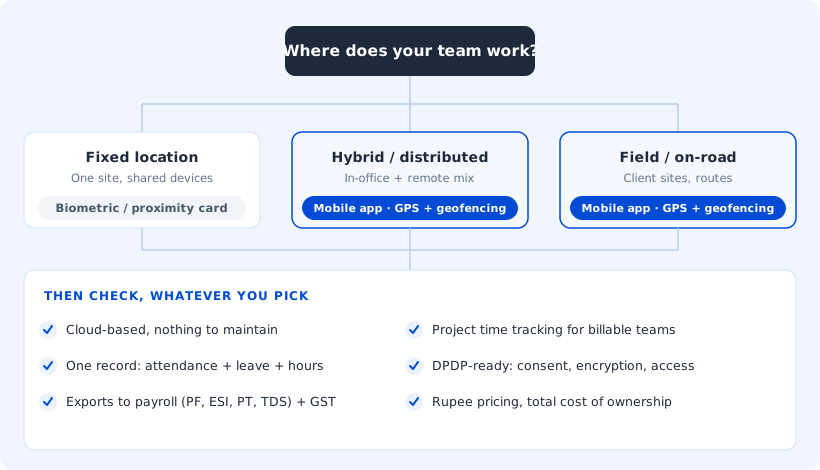
Start with where your team works. A team at one fixed location can use biometric devices or proximity cards. A distributed, hybrid or field team needs a mobile app. A mixed team needs both in one system.
Keep presence and hours in one record. Attendance management tells you who was present and for how long. Time tracking tells you where those hours went. An agency that bills by the hour needs both in one place, or the hours it bills and the hours its team worked drift apart.
Compare total cost, not the sticker price alone. Price each option over 12 months: subscription, setup, training, support and any hardware. If you also want screenshots, compare pricing as well as features.
Run a two-week pilot. A demo uses sample data, so put one team on the new tool alongside your current method for two weeks, with your own rosters. Then check whether everyone clocked in without help, whether late and absent counts match yours, and whether leave approvals took less time.
Attendance software for IT and software services companies
IT services firms usually need more from attendance software than a punch-in record. Engineers split the week between office, home and sometimes a client site. Support and delivery teams often work UK or US overlap hours. And the hours people work have to match the hours you bill clients.
Hybrid and remote staff. People clock in from wherever they work, on the web app, Android or iPhone, and track project time in the Windows or macOS desktop app. A work-from-home day is a WFH request. It goes into the same approval queue as leave, overtime and time corrections, so managers approve everything in one place. See how to track remote employees.
Shifts for UK and US overlap hours. Set up a shift for each working pattern, such as an India day shift and a UK or US overlap shift, each with its own grace period. A 2 pm start is then judged against 2 pm, not 9:30 am. Breaks are recorded by type, so a lunch break is logged as lunch rather than as a late return. More on shift management, or watch the shifts walkthrough video.
Timesheets tied to projects and billable hours. Attendance tells you someone was working. Project time tells you which client it went to. In Trakkar, people log time against projects with timers or manual entries. The desktop app detects idle time, and project cost counts each session's full length. Each project's Budget tab shows cost to date against the project's value. See timesheet software, how to track billable hours, and our post on billable utilization and realization.
Leave without surprises on delivery. Leave requests and approvals sit next to project hours. India holiday presets are built in, and you can add custom holidays, such as a client's public holiday. Delivery leads can see who is out before they plan a sprint. Read more on leave tracking and project delivery, and on unplanned leave and agency project margins.
Screenshots and app tracking, set per person. For remote teams that need proof of work, screenshots and app/URL tracking run in the Windows and macOS desktop app and are on by default; admins can turn each off for any person. Screenshots are taken every 10 minutes by default, with a different interval for anyone who needs it. Tell your team before they start using the desktop app.
Payroll stays in your payroll tool. Trakkar doesn't run payroll.
India time and attendance software market
Market Research Future (report page updated September 2026) estimates India's time and attendance software market at USD 229.38 million in 2025. It projects USD 661.88 million by 2035, an 11.3% CAGR. The report discusses cloud-based systems, mobile access and remote and hybrid work.
Globally, Spherical Insights (2024) puts the market at USD 3.92 billion in 2023 and projects USD 11.09 billion by 2033, a 10.96% CAGR, with Asia-Pacific the fastest-growing region.
Who buys attendance software in India
Market Research Future splits India's buyers into small, medium and large enterprises, and by industry: healthcare, retail, manufacturing and education. It puts the 2024 market at USD 203.88 million. It says cloud-based systems lead the market and are especially favored by small and medium-sized businesses that want to manage attendance without a big upfront investment. Web-based attendance is also gaining ground with startups and SMEs because it is easy to access and use. The report names Kronos, Tally Solutions, Zoho, TimeWatch, Replicon and Qandle among the key players.
For a small team, that usually means choosing a cloud tool with web and mobile clock-in and a per-user price, rather than buying hardware. For what that looks like in practice, see our guide to attendance management software for Indian teams.
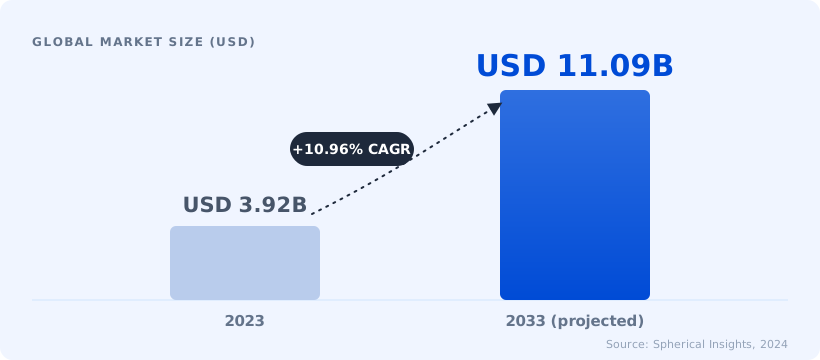
Estimates vary a lot between research firms, so read these figures as a trend rather than an exact size. For a buyer, the useful point is where the growth is coming from: cloud and mobile attendance for hybrid teams.
How Trakkar fits
Trakkar records clock-in and clock-out on web, Android and iPhone, with grace periods per shift and typed breaks. Leave, WFH and correction requests are approved in the same place, so presence and time off sit in one record. A team attendance heatmap shows patterns at a glance. Time tracking shows where the hours went by project and person, with margin on each project's Budget tab. Screenshots run in the desktop app only, on by default and set per person. Invoices are GST invoices with your client's GSTIN.
Pricing is one plan, ₹120/user/month + GST list price ($5/user/month outside India), with no setup fee. You pay upfront for 6 months (5% off, ₹114) or 12 months (10% off, ₹108). See pricing. More than 100 teams use Trakkar, and the 14-day free trial needs no credit card.
Book a 30-minute demo
If you're choosing between a biometric setup, a spreadsheet you've outgrown and a cloud app, it helps to see one run against your own workflow. Book a 30-minute demo and we'll walk through your team's attendance, leave and project hours.