

Time tracking · India
Employee Time Tracking Software for India: Time, Attendance and Projects in One Tool
Hours, attendance, leave and projects in one tool, priced in rupees.
- 14-day free trial
- No credit card
- ₹120/user/month + GST
Read the overview
If you run a service business, the time tracking software you pick in India should do three things. Track hours, keep attendance and leave in the same place, and bill you in rupees. Trakkar does all three. It costs ₹120 per user per month plus GST, paid upfront in INR, with a free trial that needs no credit card.
If all you need is a simple timer, a free tool may be enough. But if you run an agency, a consultancy or any team that works on client projects, and you are comparing employee time tracking software in India, read on. This page covers what to look for, how Trakkar works, what it costs, and how it compares with the tools Indian business owners shortlist most.
What Indian businesses need from employee time tracking software
Most time tracking tools were built for teams in the US or Europe. They work fine in India. But a few things matter more here.
- Pricing in rupees.USD prices move with the exchange rate, and your card may add a forex charge on top. A rupee price is easier to budget for.
- Attendance and leave as well as hours.Indian teams run on shifts, grace periods, half days, WFH requests and a long list of holidays. When attendance lives in one tool and hours in another, someone ends up reconciling spreadsheets every month.
- Projects and timesheets together.A service business needs to see hours by client and by project, not only by person.
- Monitoring your team can trust.Screenshots can help with remote work, but only when people know what is captured and why.
- Simple payment.You pay in INR through Razorpay, an Indian checkout, so billing stays simple.
All time tracking details
Here is what you get:
- Pricing in rupees. USD prices move with the exchange rate, and your card may add a forex charge on top. A rupee price is easier to budget for.
- Attendance and leave as well as hours. Indian teams run on shifts, grace periods, half days, WFH requests and a long list of holidays. When attendance lives in one tool and hours in another, someone ends up reconciling spreadsheets every month.
- Projects and timesheets together. A service business needs to see hours by client and by project, not only by person.
- Monitoring your team can trust. Screenshots can help with remote work, but only when people know what is captured and why.
- Simple payment. You pay in INR through Razorpay, an Indian checkout, so billing stays simple.
Before you compare tools, decide what you need one for most. Is it payroll, client projects or productivity? That answer cuts the list down fast.
How Trakkar handles time tracking
Trakkar's desktop app tracks time on Windows and macOS. There is more detail on our page about desktop time tracking with screenshots.
Here is what you get:
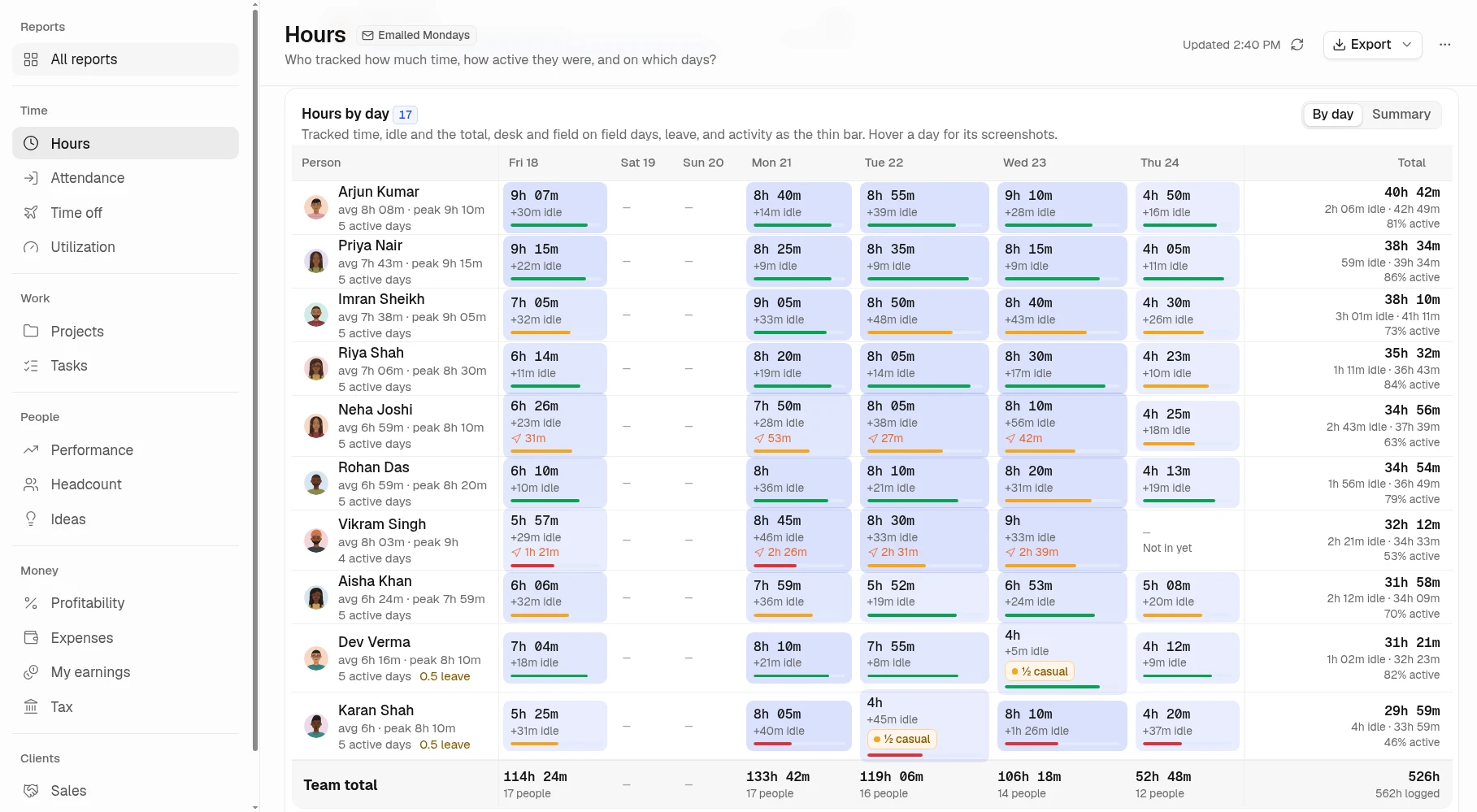
- Timers, not memory.Start a timer on a task and Trakkar logs the hours, so nobody has to rebuild a timesheet from memory.
- Idle time detection.The desktop app spots idle time. Project cost counts each session's full length, idle time included.
- Manual entries and time corrections.Forgot to start the timer? Add a manual entry. Managers approve time corrections in Time > Requests.
- Screenshots, on your terms.They run in the Windows and macOS desktop app and are on by default. Admins can turn them off for anyone and set each person's interval (every 10 minutes by default).
- App and URL tracking, set per person.It runs in the Windows and macOS desktop app only and is on by default; admins can turn it off for each person.
- If your connection drops.Trakkar keeps your timer running and syncs your time once you're back online. Screenshots pause while you're offline.
- Timesheets and reports.Clean timesheets by person, project and day, ready to export.
All time tracking details
Here is what you get:
- Timers, not memory. Start a timer on a task and Trakkar logs the hours, so nobody has to rebuild a timesheet from memory.
- Idle time detection. The desktop app spots idle time. Project cost counts each session's full length, idle time included.
- Manual entries and time corrections. Forgot to start the timer? Add a manual entry. Managers approve time corrections in Time > Requests.
- Screenshots, on your terms. They run in the Windows and macOS desktop app and are on by default. Admins can turn them off for anyone and set each person's interval (every 10 minutes by default).
- App and URL tracking, set per person. It runs in the Windows and macOS desktop app only and is on by default; admins can turn it off for each person.
- If your connection drops. Trakkar keeps your timer running and syncs your time once you're back online. Screenshots pause while you're offline.
- Timesheets and reports. Clean timesheets by person, project and day, ready to export.
If you want a walk-through of time tracking in Trakkar, the video follows a session from the desktop timer to the timesheet.
Attendance, leave and Indian holiday calendars
Time tracking tells you what people worked on. Attendance tells you who showed up, when, and from where. Trakkar keeps both in one place.
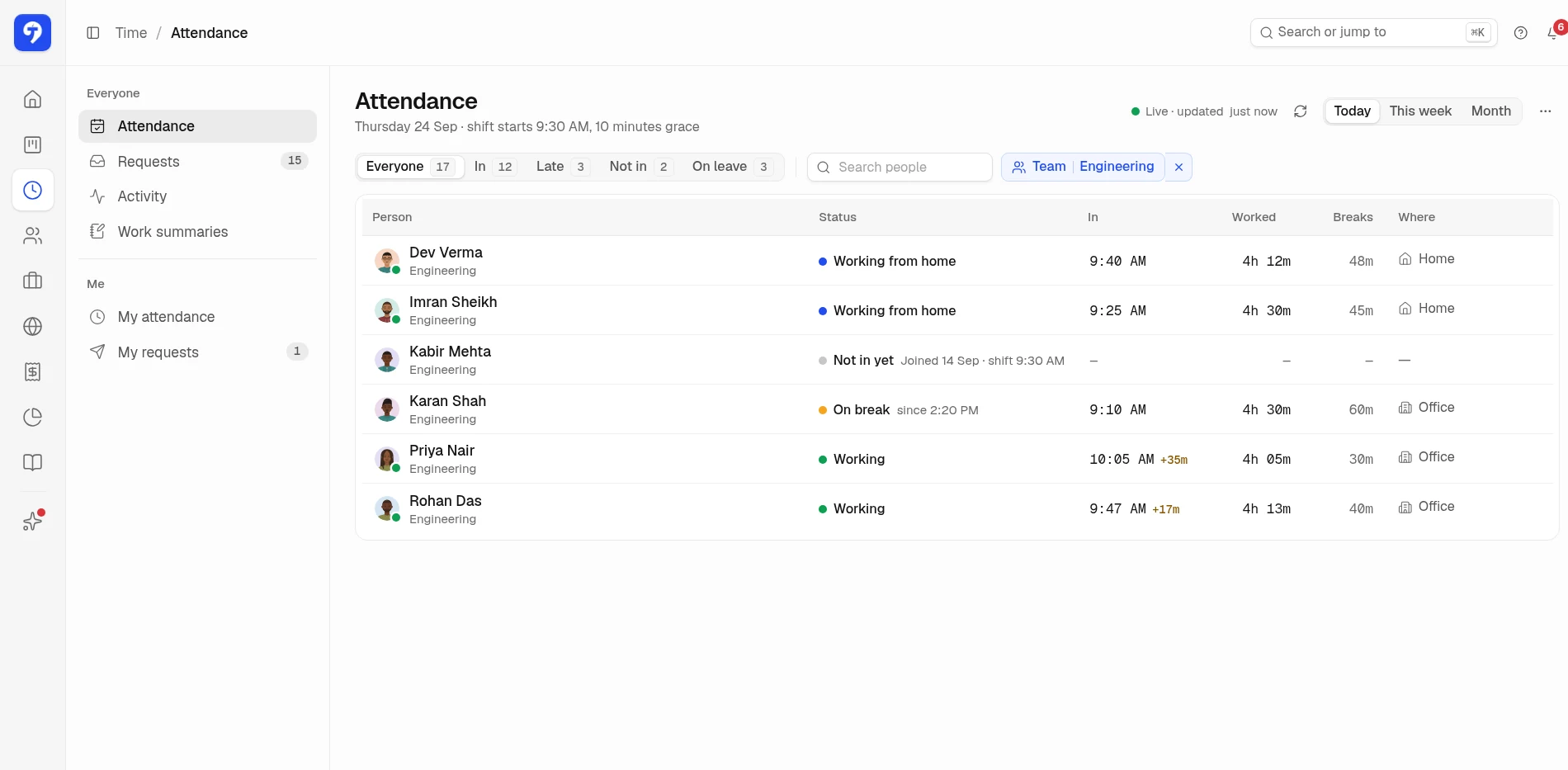
- Clock in and out.from the web or a phone, with typed breaks.
- Office or remote.Location is recorded, so you can tell office days from home days.
- Shifts and grace periods.Create shift templates, assign them, and set a grace period for late arrivals.
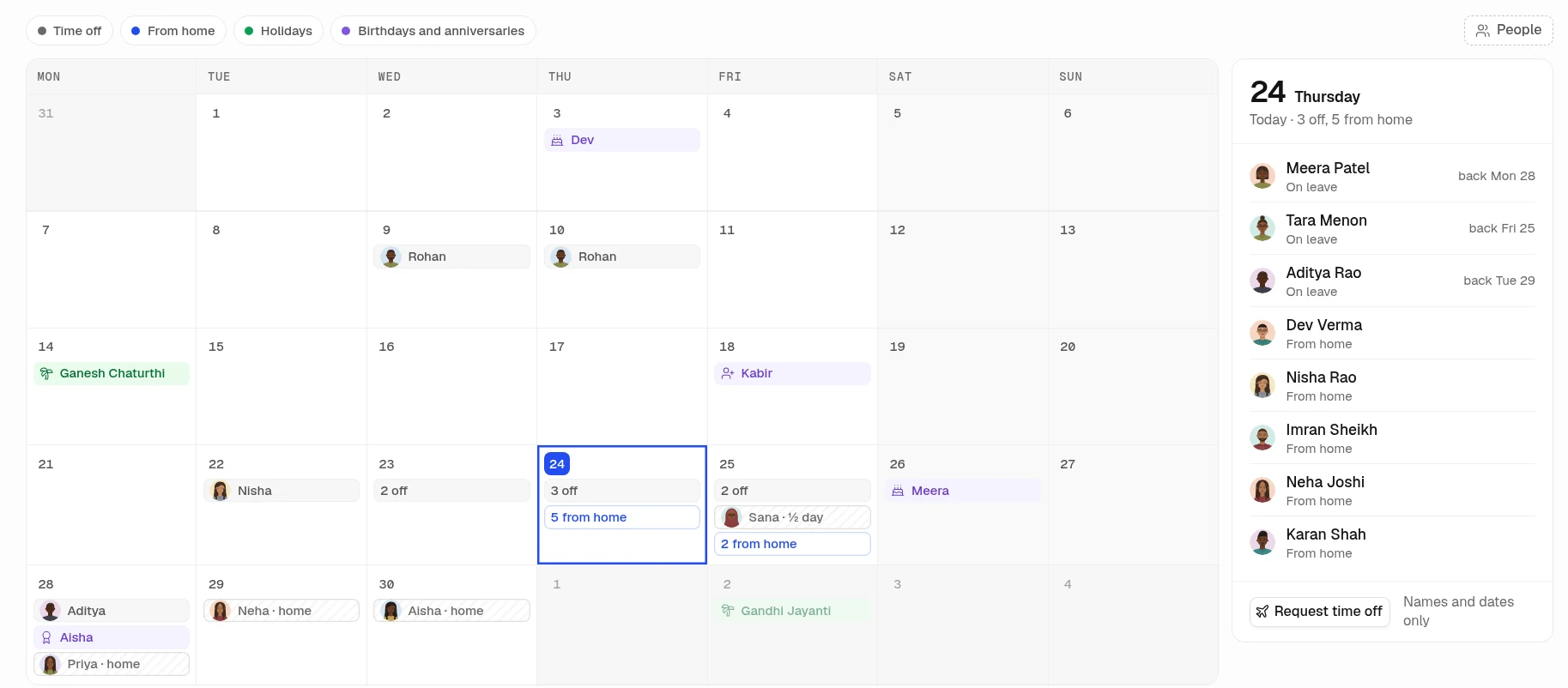
- Holiday calendar.Set up your company holidays for the year, including the Indian national and festival holidays your business observes.
- Leave types and balances.Create the leave types you actually use, such as casual, sick and earned leave, with balances and accruals.
- WFH and overtime requests.A team member raises a request and a manager approves it.
- One approval queue.Leave, WFH and attendance corrections sit together, not scattered across emails and WhatsApp messages.
- Team heatmap.See the whole team's attendance at a glance. Admin edits are logged.
Projects and timesheets in the same place
For a service business, hours only mean something when they sit against a client and a project. So project and task management comes in the same plan.
- Tasks with checklists, attachments, comments and dependencies on other tasks.
- Kanban board, Gantt view and custom workflow statuses.
- Async daily standups, filled in from yesterday's tasks and time.
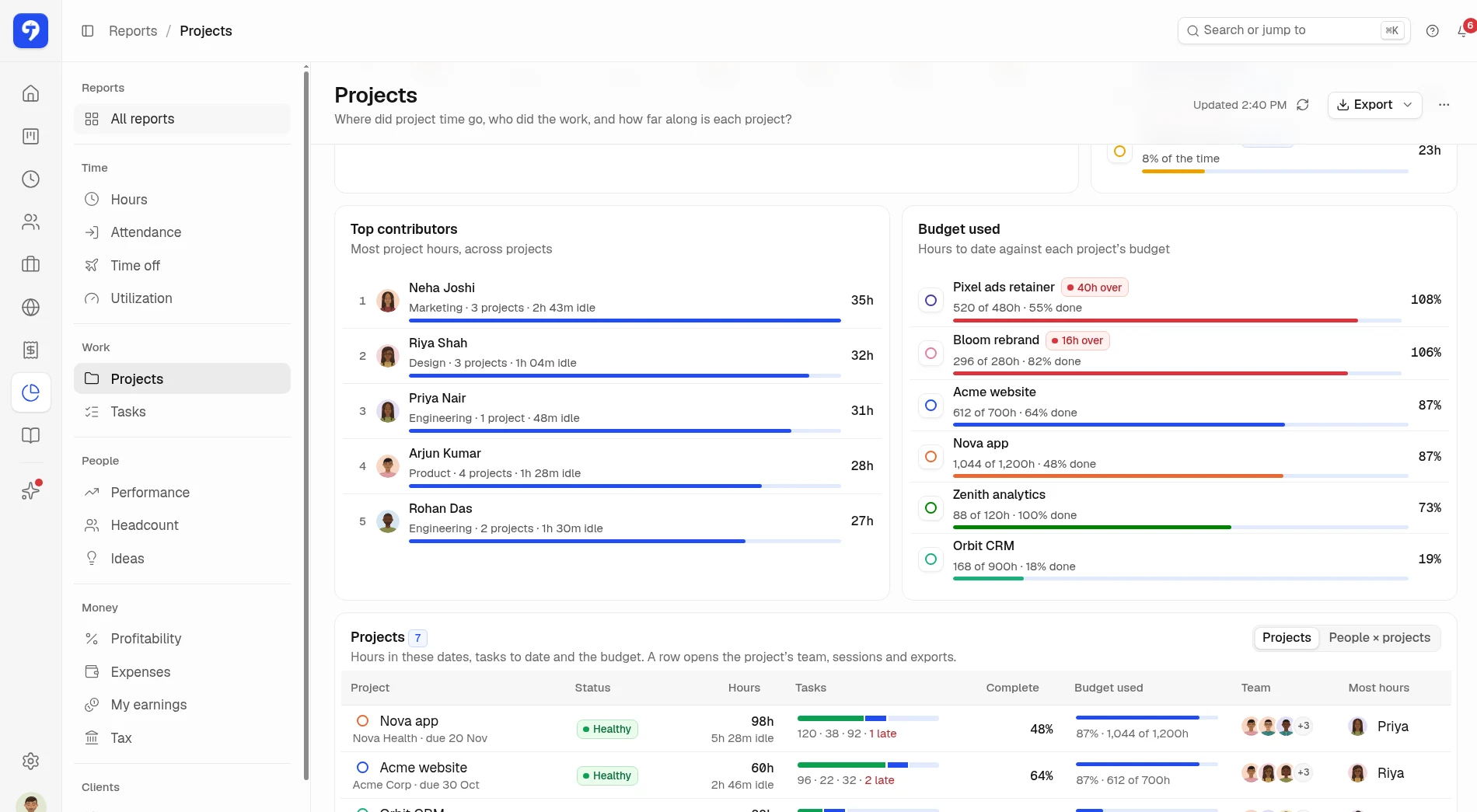
- Project reports and member workload.
Time, attendance and projects share one login. Nobody has to match names across three exports at month end. The same plan also includes invoicing, quotations and a client portal, with GST and GSTIN support for Indian businesses.
Time tracking software pricing in India
Time tracking software pricing in India for Trakkar is ₹120/user/month + GST on the one Premium plan ($5/user/month outside India). Prepay 6 months for 5% off, or 12 months for 10% off. Every module is included. The 14-day trial is free for any number of users. See pricing. 100+ teams have signed up for Trakkar.
Premium plan: ₹120 per user per month + GST
₹120/user/month + GST
₹114 on 6 months, ₹108 on 12 months.
Billed in INR and paid upfront, once, for 6 months (5% off, ₹114/user/month + GST) or 12 months (10% off, ₹108/user/month + GST). There is no monthly billing. For example, 10 users for 6 months is ₹6,840 + GST, paid once. Pay through Razorpay's secure checkout. Premium includes:
- Time tracking, with time corrections approved in Time > Requests
- Screenshots and app and URL tracking in the desktop app
- Attendance, shifts, leave and holiday calendar
- Invoicing, quotations and client portal
- Reports and role permissions
What a 10 or 25 person team pays
| Team size | List price per month (before GST) | 6 months upfront, 5% off (before GST) |
|---|---|---|
| 5 users | ₹600 | ₹3,420 |
| 10 users | ₹1,200 | ₹6,840 |
| 25 users | ₹3,000 | ₹17,100 |
| 50 users | ₹6,000 | ₹34,200 |
Premium starts with a 14-day free trial, and you do not need a credit card to sign up.
Adding users mid-term
You can add users at any time. New seats added mid-term are a one-time charge at the ₹120/user/month list rate, prorated for the days left in your 6- or 12-month term.
Trakkar vs popular time tracking software in India
These are the tools Indian buying guides name often for this search. To pick them, we counted mentions in seven Indian listicles and in the live search results for both queries. We checked each one on its own website in October 2026. Prices change, so please confirm on vendor site before you decide. Where we could not confirm a fact on the vendor's site, the table says so.
| Capability | Trakkar | Hubstaff | Time Doctor | Clockify | Jibble | Zoho People |
|---|---|---|---|---|---|---|
| Listed price | ₹120/user/month + GST (one plan, all features) | $4.99 to $10 per seat/month billed annually for Starter to Team; Enterprise is $25/seat/month billed annually (USD). Confirm on vendor site | Not confirmed (USD; paid plans Basic, Standard, Premium). Confirm on vendor site | Free up to 5 users; paid from $5.49 per seat/month billed annually (USD), Standard plan. Confirm on vendor site | Free plan for unlimited users; paid plans Not confirmed. Confirm on vendor site | INR pricing offered on site; amounts Not confirmed. Confirm on vendor site |
| Billed in INR | Yes | Not confirmed | Not confirmed | Not confirmed | Not confirmed | Yes (INR option on pricing page) |
| Free trial | Yes, no card | 14 days, no card | 2 weeks of Premium | 7 days of Pro features | Free plan | 30 days |
| Desktop time tracking | Yes | Yes | Yes | Yes (timer and auto tracker) | Desktop app: yes. Automatic tracking: Not confirmed | Not confirmed |
| Screenshots | Yes, set per person | Yes | Yes | Not confirmed | Yes | Not confirmed |
| Attendance and shifts | Yes | Yes | Yes (Standard) | Attendance: yes (Standard). Scheduling: Pro plan | Yes | Yes (higher tiers) |
| Leave and holiday calendar | Yes | Yes (time off and holidays) | Leave tracking yes (Standard); holiday calendar Not confirmed | Yes (Standard) | Time off yes; holiday calendar Not confirmed | Leave yes; holiday calendar Not confirmed |
| Projects and tasks | Yes (Kanban, Gantt) | Yes | Yes | Yes | Yes (project time) | Timesheets yes; project tools Not confirmed |
| Invoicing | Yes, with GST and GSTIN support | Yes | Not confirmed | Yes (Standard) | Yes | Not confirmed |
| Good fit for | Indian service businesses that want time, attendance, leave and projects in one INR plan | Remote and field teams that want deep monitoring and GPS | Remote and hybrid teams that want detailed productivity analytics | Budget teams that want a free or low-cost timer | Teams that want free clock-in and attendance with face recognition or GPS | Companies already on Zoho that want HR with attendance and timesheets |
Sources: hubstaff.com/pricing, timedoctor.com/pricing, clockify.me/pricing, jibble.io/pricing, zoho.com/people/zohopeople-pricing.html, all checked October 2026. Feature availability often depends on the plan. Hubstaff and Jibble features are listed on their sites, but we did not confirm which plan includes each one.
Weighing a specific tool? See our Hubstaff alternative and Time Doctor alternative pages, or browse all Trakkar comparisons. To weigh 11 tools side by side, compare the best time tracking software in India.
Want to see it on your own team first?
Book a 30-minute demo and we'll walk through time, attendance, leave and GST invoicing with your setup in mind. We help you set up afterwards too.
Or try it free for 14 days (opens in a new tab), no card needed.
How to choose the right tool for your team
No one tool suits every Indian business. Start from your main need.
- You need payroll with statutory deductions.Look at an HR and payroll suite such as Keka or greytHR. That is what they are built for. Trakkar is not a payroll tool.
- You only need a basic timer for a few people.A free plan from Clockify or Jibble may be all you need.
- You need deep monitoring for a large remote or hybrid team.Hubstaff and Time Doctor focus heavily on activity analytics.
- You run a service business and want time, attendance, leave and projects together, priced in rupees.That is the team we built Trakkar for.
A few practical checks before you buy:
- Work out the real monthly cost in rupees, including GST and any forex charge on USD plans.
- Check whether attendance and leave are included or sold as a higher tier.
- Ask whether screenshots are optional and whether employees can see their own.
- Run a free trial with a small team for a week or two before you roll it out to everyone.
Trusted by 100+ teams across India






Related pages
Other high-intent guides for Indian teams.
Frequently asked questions
Which time tracking software should I choose in India?
It depends on what you need. For payroll-led HR, an Indian HRMS is usually the right fit. For a free basic timer, Clockify or Jibble can work. If you run a service business and want time tracking, attendance, leave and projects in one tool billed in rupees, Trakkar is a strong option at ₹120 per user per month plus GST.
How much does Trakkar cost in India?
Trakkar has one plan, Premium, at ₹120 per user per month plus GST, with all features, billed in INR. For a 10 person team that is ₹1,200/month + GST, paid upfront for 6 months (5% off) or 12 months (10% off).
How much does time tracking software cost in India?
Trakkar is ₹120/user/month + GST, with every module included. Prepay 6 months for 5% off, or 12 months for 10% off. Outside India the price is $5/user/month. The 14-day trial is free for any number of users, and you don't need a credit card.
Can I pay for Trakkar in rupees?
Yes. Trakkar bills in INR, and you pay through Razorpay's secure checkout.
Does Trakkar handle Indian holidays and leave?
Yes. You can set up a holiday calendar, create leave types with balances and accruals, and handle WFH and overtime requests through approvals. Shifts and grace periods are included too.
Can I track attendance and project time in one tool?
Yes. Clock-ins, shifts, leave, tracked hours and projects all sit in the same Trakkar account, under one login and one plan.
Does Trakkar take screenshots of employees?
Yes, by default, in the Windows and macOS desktop app. Admins can turn screenshots off for anyone and set each person's interval (every 10 minutes by default).
Which devices does Trakkar work on?
The desktop time tracker runs on Windows and macOS. Attendance clock-in works from the web and from a phone. Screenshots and app/URL tracking run in the Windows and macOS desktop app and are on by default; admins can turn each off for any person.
Is there a free trial?
Yes. Premium starts with a 14-day free trial, and no credit card is needed to sign up. Nothing is charged until you choose a paid plan.
Try Trakkar
₹120/user/month + GST ($5/user/month outside India). 14-day free trial for any number of users, no credit card. Every module is included.