

Guides
Problem-solving guides for Indian agencies
Step-by-step workflows built on Trakkar at ₹120/user/month + GST.
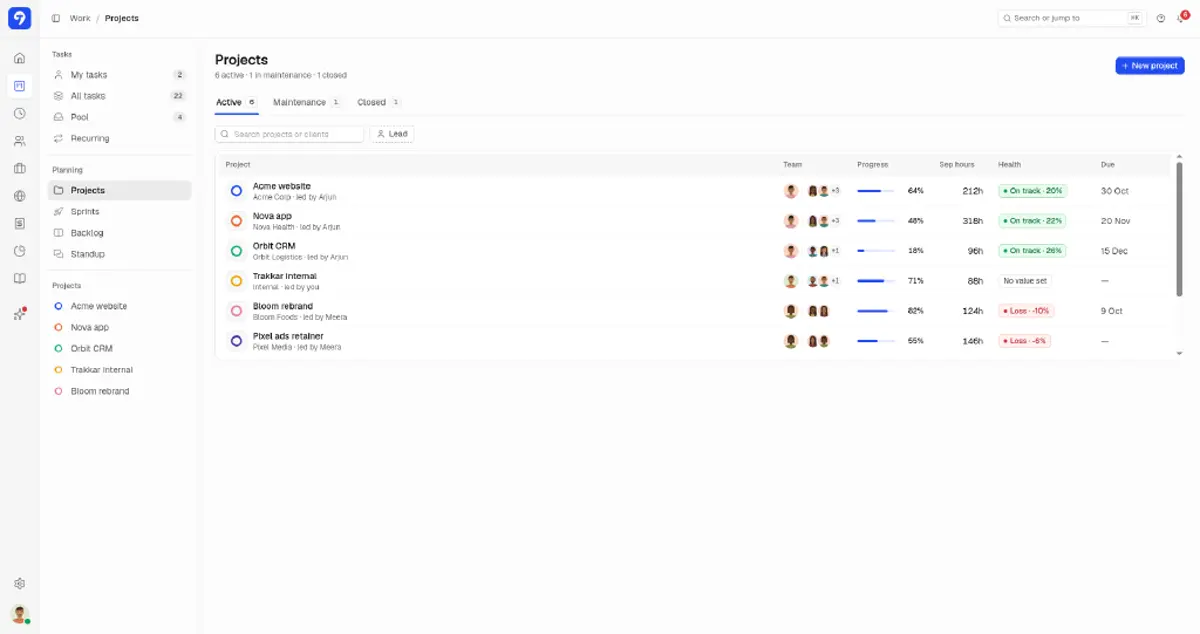
What Trakkar includes
Trakkar combines a desktop time tracker, attendance and leave management, project and task workflows, invoicing, and a client portal, built for agencies and client-service teams.
Time tracking & productivity
Desktop sessions, manual entries and async daily standups, with time corrections approved in Time > Requests.
- Desktop tracker for Windows and macOS, with idle time flagged
- Screenshot capture, set per person
- App and URL usage tracking
- Async daily standups from yesterday's tasks and time
- Manual time entries, plus time corrections approved in Time > Requests
- Cost rates applied to every tracked hour
Projects & tasks
From task pool to Gantt, with workflows and commit linking.
- Tasks with checklists, attachments, comments, and relations
- Recurring tasks, task pool, and custom field definitions
- Kanban board, Gantt view, and custom workflow statuses
- Project reports and member workload allocation
- GitHub and Azure DevOps commit-to-task linking
People, attendance & leave
Clock events, shifts, leave balances, WFH, and overtime.
- Web and mobile clock-in/out with typed breaks
- Shift templates, assignments, and holiday calendar
- Attendance week view with late and half days, and an activity heatmap
- Leave requests and approvals, with leave balance shown to approvers
- WFH and overtime request workflows with approvals
HR & lifecycle
Onboarding through offboarding with policies and documents.
- People hub with onboarding and offboarding checklists
- Policy publishing with employee acknowledgement tracking
- Required document types with verification workflow
- Company asset register with assignment tracking
- HR letters and employee files
Invoicing & client work
Billing, quotations, a client address book, and a client portal.
- Invoices with configurable tax types and numbering (GST and GSTIN supported for India)
- Send quotes, track whether they're accepted, and see which invoice each one became
- Partial payments, TDS, and unpaid invoices on your Finance overview, grouped by how late they are (1-30, 31-60, 61-90, 90+ days)
- Client address book (contact person, email, phone, address, GSTIN/PAN, bank details), products and services list, and org tax types
- Client portal where clients see tasks and hours and download invoices
- Invoice numbers that restart each Indian financial year
Platform
Web, desktop, and mobile apps plus automations.
- Web app plus desktop tracker (Windows and macOS)
- Native iOS and Android apps with clock-in and leave
- Automations engine for scheduled actions and notifications
How do I track billable hours for client projects?
Log time against billable projects and tasks, and have managers approve any time corrections in Time > Requests. Then check billable hours in the project time report and create a GST invoice in the same product. If you are still on spreadsheets, download the free weekly timesheet template. Trakkar Premium at ₹120/user/month + GST includes time tracking, approvals, GST invoicing, and a client portal.
How do I manage employee attendance in India?
Set up shifts, grace minutes, and leave types. Then run the day from the live attendance board, with WFH and leave going through the Requests queue. Attendance, leave, and WFH records stay in one place. See attendance management software for India for the full product view.
How do I bill tracked hours on a GST invoice?
Log billable time against projects and review the project time report for your billing period. Then create the GST invoice in Trakkar: pick the client (their GSTIN comes from the contact), add lines from saved products or type them in, choose the tax rate, and export the PDF. Trakkar Premium at ₹120/user + GST includes invoicing.
How do billable hours impact project profitability?
Project value is the fixed contract value you set, and every logged hour adds to cost at the cost rate of the person who logged it. Under-logged hours hide real cost, and non-billable rework adds cost without adding value, so margin drops even when the invoice looks fine. The Trakkar Profitability report shows billable hours, billable %, cost to date, and margin for each project.
How do I see project profitability from tracked time?
Set a cost rate for each team member, enter the value of each project, and log time against projects. The Profitability report shows value minus cost to date, so you see margin while the project is still running.
What is project profitability tracking?
For project profitability, Trakkar project and portfolio reports show the value, cost to date, profit, and margin for each project, plus a blended margin across the portfolio. The utilization report tracks billable hours against available hours.
Does Trakkar replace separate invoicing and time tracking tools?
Yes. Trakkar Premium at ₹120/user/month + GST includes time tracking, GST invoicing, attendance, Indian leave, project reports, and a client portal. Hybrid teams can start from remote employee tracking software for India.
Try Trakkar
₹120/user/month + GST ($5/user/month outside India). 14-day free trial for any number of users, no credit card. Every module is included.