

Attendance · Leave · India
Attendance Management Software for Indian Teams
Clock-in · shifts · holidays · leave and WFH · ₹120/user/month + GST
- 14-day free trial
- No credit card
- ₹120/user/month + GST
Read the overview
Time and attendance software records when each person clocks in and out, checks that time against their shift, and keeps leave, WFH and holidays in the same record. Trakkar does this for Indian service businesses, including small teams and startups that also need project hours and GST invoicing in one plan. Staff clock in from the web app, the Android and iPhone apps, or the desktop app. Admins pin your office locations and set each person to clock in Anywhere or At an office, so their clock-in counts only within range of that office. Each shift has its own grace period, India holiday presets are built in, and leave, WFH and overtime requests go to one approval queue. It costs ₹120/user/month + GST, with a 14-day free trial for any number of users and no credit card.
This page covers what attendance management software does, what Indian businesses should check before buying, how attendance works in Trakkar, and when an HR and payroll suite is the better fit. All prices are in rupees.
For market context and a longer buying checklist, see India time and attendance software market.
Related: Shift management software for Indian teams, Timesheet software for Indian businesses, Free CA firm attendance register (Excel), Monthly attendance percentage calculator, India overtime calculator, How to manage employee attendance in India.
What is time and attendance software?
Time and attendance software is where your team marks the start and end of the working day, and where managers see who is in, who is on leave and who is working from home. It takes the place of the paper register, the Excel sheet and the "who is in today" message, and gives staff and managers one record to look at. Buyers also search for it as attendance management software. The job is the same.
Most attendance tools cover some mix of these:
- Clock in and clock out,.from a phone, the web, a desktop app, or a device at the office. If you need a biometric machine, ask the vendor to show you that setup. Trakkar does not run biometric devices.
- Shift timings and grace periods,.so a set rule covers a few minutes' delay and nobody has to argue about it.
- Breaks,.recorded during the day.
- Leave, WFH and holidays,.so planned absence sits next to attendance.
- Approvals,.so corrections and requests go through a manager instead of being edited quietly.
All time tracking details
Here is what you get:
- Clock in and clock out, from a phone, the web, a desktop app, or a device at the office. If you need a biometric machine, ask the vendor to show you that setup. Trakkar does not run biometric devices.
- Shift timings and grace periods, so a set rule covers a few minutes' delay and nobody has to argue about it.
- Breaks, recorded during the day.
- Leave, WFH and holidays, so planned absence sits next to attendance.
- Approvals, so corrections and requests go through a manager instead of being edited quietly.
Clocking in tells you someone was at work. Time tracking tells you which project and task the hours went into. In Trakkar those records sit in the same account. If you also raise GST invoices in Trakkar, you add the invoice lines yourself.
Attendance register or attendance software
| Item | Register or spreadsheet | Trakkar |
|---|---|---|
| Marking attendance | Signature or a typed time | Clock in and out from the web app, Android app, iPhone app or desktop app |
| Late arrivals | Someone checks the register by hand | Each shift has its own grace period |
| Breaks | Not recorded, or noted by hand | Breaks logged by type at clock-in and clock-out |
| Holidays | A list pinned on the notice board | India holiday presets plus your own custom holidays |
| Leave, WFH and overtime | Messages, emails and a separate sheet | One approval queue |
| Fixing a wrong entry | Anyone with access edits the cell | Time correction request, approved by a manager |
| Price | Free | ₹120/user/month + GST, with a 14-day trial for any number of users and no card |
What Indian businesses should check in attendance software
- How people clock in.Check which platforms the vendor supports and what each app does. If you need biometric machines or face recognition, ask the vendor to show you that exact setup. Trakkar does not run those devices. For office clock-in, ask whether you can pin each office and set each person to clock in Anywhere or At an office, and ask what each app actually checks at clock-in.
- Grace periods per shift.A morning shift and a late shift rarely need the same rule. Make sure the grace period is set on each shift, not once for the whole company.
- Indian holidays built in.Look for India holiday presets, plus the option to add your own local or company holidays.
- Leave, WFH and attendance in one tool.When they sit in different apps, the numbers won't match at month end.
- One place for approvals.Leave, WFH, overtime and corrections should reach a manager in a single queue.
- Price in rupees, with GST.Work out the full cost for your team size, including GST and any setup fee.
- Payroll.If you want salaries worked out from attendance in the same tool, check that the vendor actually runs payroll. Many attendance tools don't.
All time tracking details
Here is what you get:
- How people clock in. Check which platforms the vendor supports and what each app does. If you need biometric machines or face recognition, ask the vendor to show you that exact setup. Trakkar does not run those devices. For office clock-in, ask whether you can pin each office and set each person to clock in Anywhere or At an office, and ask what each app actually checks at clock-in.
- Grace periods per shift. A morning shift and a late shift rarely need the same rule. Make sure the grace period is set on each shift, not once for the whole company.
- Indian holidays built in. Look for India holiday presets, plus the option to add your own local or company holidays.
- Leave, WFH and attendance in one tool. When they sit in different apps, the numbers won't match at month end.
- One place for approvals. Leave, WFH, overtime and corrections should reach a manager in a single queue.
- Price in rupees, with GST. Work out the full cost for your team size, including GST and any setup fee.
- Payroll. If you want salaries worked out from attendance in the same tool, check that the vendor actually runs payroll. Many attendance tools don't.
How attendance works in Trakkar
- Set up your shifts. Add the shifts your team works in Settings > Shift Management, each with its own grace period for late arrivals.
- Add your holidays. Start from the India holiday presets and add any custom holidays your company keeps.
- Staff clock in and out from the web app, the Android and iPhone apps, or the desktop app. Admins choose web, phone or both, and can pin your office locations and set each person to clock in Anywhere or At an office, so a person's clock-in counts only within range of that office. Breaks are logged by type.
- You can see what a clock-in creates in attendance, from the check-in to the day's record.
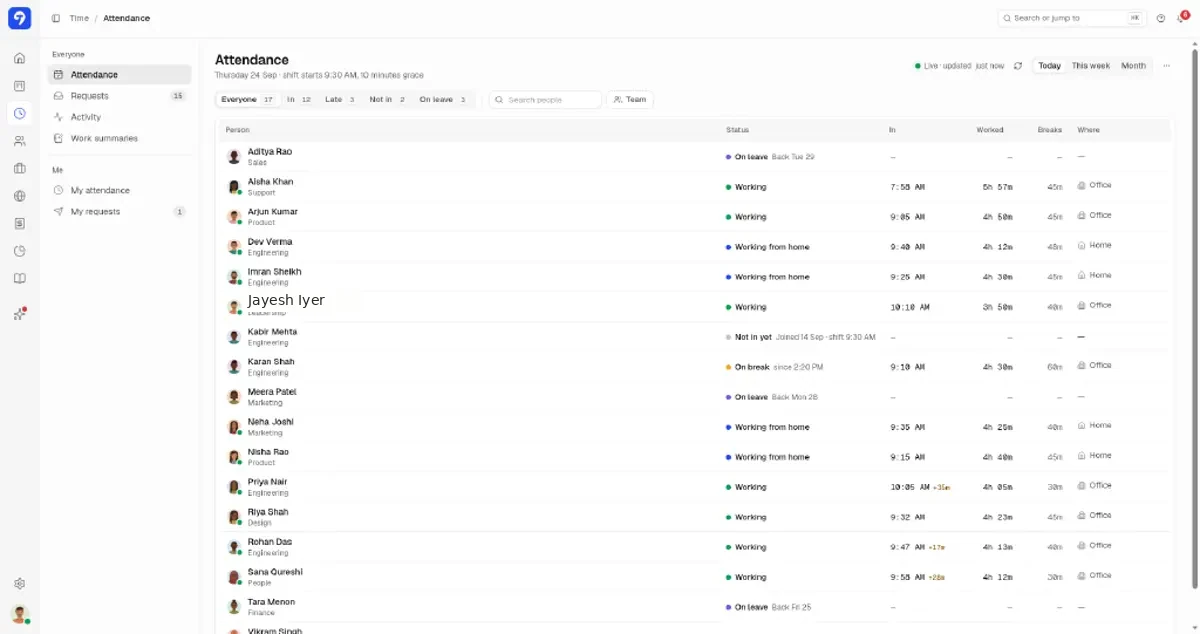
- See who's in. Today's attendance shows who is in the office, who is working from home on an approved WFH day, and who is at a client site. "Home" comes from an approved WFH request, never from GPS. The Attendance screen also has a team attendance heatmap.
- Requests go to one queue. Leave, WFH, time corrections, overtime and expenses all land in Time > Requests > To approve. Overdue requests come first, then the ones that have waited longest. Managers can also approve leave, work-from-home, time-correction, overtime and expense requests from the Android and iPhone apps.
- There is also a walk-through of how a leave request updates the balance and the team calendar.
For more on leave requests, approvals and the team calendar, see leave management software in India.
Attendance sits in the same account as time tracking and projects, with one login and one plan. If your team also works on client projects, they can track time against tasks in the desktop app on Windows or macOS (Apple Silicon and Intel). Get it from the download page. For a closer look at shift setup, see shift management software.
Joining, leaving and everything in between
Attendance starts the day someone joins. Invite people with a link, then run onboarding and offboarding checklists with a handover to a colleague. Letters and employee files sit with that record, and you can group people by team and office.
For the joining and leaving checklists in more detail, see every Trakkar feature, module by module.
Attendance and hours worked on projects
Clocking in tells you someone was at work. For a service business, the next question is what the hours went into. In Trakkar, staff track time against projects and tasks in the desktop app, which also flags idle time. Screenshots and app and URL tracking run in the desktop app and are on by default, and admins can turn each off for any person. That puts attendance, leave and tracked hours side by side instead of in three tools. See how timesheet software for Indian businesses groups those hours.
When an HR and payroll suite may suit you better
Trakkar is built for service businesses that want attendance, leave, shifts and tracked hours in one place. Some teams need something else:
- You want payroll.Trakkar doesn't run payroll, salaries or statutory deductions such as PF and ESI. If salaries worked out from attendance are your main need, an HR and payroll suite is the better fit.
- You run a large hourly workforce on biometric machines,.such as a factory or a multi-site floor. An attendance tool built around devices is likely a better fit, and per-employee attendance-only plans are often priced lower.
- You plan large rotating rosters.A dedicated roster tool may suit you better. Book a 30-minute demo to see whether Trakkar's shift setup is enough for you.
- You need live location or field-sales GPS tracking.Trakkar doesn't offer that. It can only limit clock-in to an office you have pinned, person by person.
All time tracking details
Here is what you get:
- You want payroll. Trakkar doesn't run payroll, salaries or statutory deductions such as PF and ESI. If salaries worked out from attendance are your main need, an HR and payroll suite is the better fit.
- You run a large hourly workforce on biometric machines, such as a factory or a multi-site floor. An attendance tool built around devices is likely a better fit, and per-employee attendance-only plans are often priced lower.
- You plan large rotating rosters. A dedicated roster tool may suit you better. Book a 30-minute demo to see whether Trakkar's shift setup is enough for you.
- You need live location or field-sales GPS tracking. Trakkar doesn't offer that. It can only limit clock-in to an office you have pinned, person by person.
Comparing tools across categories? See the India time tracking software comparison.
Pricing
- One plan, Premium:.₹120/user/month + GST, with every feature included.
- Prepay 6 months for 5% off, or 12 months for 10% off (₹114 or ₹108 per user per month). No monthly billing and no auto-renewal.
- Free trial:.14 days for any number of users, and you don't need a credit card to sign up.
- No setup or onboarding fee.
- Outside India, the price is $5 per user per month.
All details: Pricing
- One plan, Premium: ₹120/user/month + GST, with every feature included.
- Prepay 6 months for 5% off, or 12 months for 10% off (₹114 or ₹108 per user per month). No monthly billing and no auto-renewal.
- Free trial: 14 days for any number of users, and you don't need a credit card to sign up.
- No setup or onboarding fee.
- Outside India, the price is $5 per user per month.
For a team of 10, a 12 month term comes to ₹12,960 plus GST. Trakkar is used by 100+ teams. See the pricing page or book a 30-minute demo.
No card needed.
Trusted by 100+ teams across India






Related pages
Other high-intent guides for Indian teams.
- Employee monitoring software for India
Screenshots · activity · ₹120/user/month + GST - Remote employee tracking software for India
Clock-in · WFH approvals · screenshots · ₹120/user/month + GST - How to manage employee attendance in India
Shifts · grace · leave · WFH · India - Shift management software for Indian teams
Shifts · grace periods · attendance · approvals · ₹120/user/month + GST - Attendance and productivity: Clock in. That's it
Product walk-through - Unplanned leave policy template and sample warning letter
Policy template · sample letter
Frequently asked questions
What is time and attendance software?
Time and attendance software records when each person clocks in and out, checks that time against their shift, and keeps leave, WFH and holidays in the same record. In Trakkar, staff clock in from the web, phone or desktop app, each shift has its own grace period, and leave and WFH requests go to one approval queue. It costs ₹120/user/month + GST.
Is time and attendance software the same as attendance management software?
Yes, in practice. Both names describe the same job: clock-in, shifts, leave and a record managers can trust at month end. This page covers that job for Indian service businesses.
Can staff mark attendance from their phone in Trakkar?
Yes. Staff can clock in and out from the Trakkar Android and iPhone apps, the web app, or the desktop app. Managers can approve leave, work-from-home, time-correction, overtime and expense requests from the Android and iPhone apps.
Does Trakkar have Indian holidays built in?
Yes. Trakkar has India holiday presets, and admins can add custom holidays for local festivals or company days off.
How are late arrivals handled?
Each shift has its own grace period, set in Settings > Shift Management. A morning shift and a late shift can each have their own allowance for late arrivals.
How are leave, WFH and corrections approved?
Leave, WFH, time corrections, overtime and expenses all go to one queue in Time > Requests > To approve. Overdue requests come first, then the ones that have waited longest. Approvers see the leave balance, and approved time off and WFH days also show on the team calendar.
Does Trakkar do payroll?
No. Trakkar handles attendance, shifts, leave and tracked hours, but it doesn't run payroll, salaries or statutory deductions. If that's your main need, an HR and payroll suite is a better fit.
How much does Trakkar cost?
Trakkar has one plan, Premium, at ₹120/user/month + GST, with every module included. Prepay 6 months for 5% off, or 12 months for 10% off (₹114 or ₹108 per user per month). There is no setup fee, and you can try it free for 14 days for any number of users, with no credit card.
Does Trakkar support biometric machines or live GPS tracking?
No. Trakkar does not run biometric devices, and it does not offer live location or field-sales GPS tracking. People clock in from the web, phone or desktop app. Admins can pin office locations and set each person to clock in Anywhere or At an office, so a clock-in counts only within range of that office.
Try Trakkar
₹120/user/month + GST ($5/user/month outside India). 14-day free trial for any number of users, no credit card. Every module is included.